Skip to content

Growth Map

The whole playbook on one page, in the order you'll need it. Every chapter has the same six parts, so you always know where to look:

Part What it answers
🧠 Skills Which skill in this repo to open
🔎 Research What to find out before you start
🛠️ Tools Websites and apps that help with the work
📚 References Official rules, limits and docs to check
📄 Templates Files to copy into your project and fill in
💬 Prompt The copy-paste prompt to run

Not sure which chapter you're in? Start with growth: 4 questions, one next step. Want a dated route instead of a map? Use Launch a Product (6 weeks) or ASO Optimization (4 weeks + monthly loop).

flowchart LR
    Z["0 · Set the target<br/>strategy"] --> A["1 · Research<br/>is it wanted?"]
    A --> B["2 · Learn from others<br/>teardowns"]
    B --> C["3 · Get paid<br/>price + payments"]
    C --> D["4 · Publish<br/>store listing"]
    D --> E["5 · Launch<br/>first 100 users"]
    E --> H["6 · Grow an audience<br/>social + email"]
    H --> F["7 · Grow in stores<br/>ASO loop"]
    F --> G["8 · Share results<br/>case study"]
    F -. monthly .-> F
    H -. weekly .-> Z

Chapter 0 is the growth-hack loop that runs above everything else: set a number, spend only where it's behind, try what competitors don't, and make every product feed one audience you own. Come back to it every Monday.

Tools listed here are examples that are free or have a free tier, not endorsements. Check each one's current terms.


0. Set the target: strategy

Part
🧠 Skills strategy-revenue-target → strategy-product-as-funnel · strategy-contrarian-marketing (when the usual channels stall) · strategy-spend-and-timing (every Monday)
🔎 Research Your current funnel numbers, what each channel brought in the last 4 weeks, what competitors all do the same way
🛠️ Tools revenue_backsolve.py · your store dashboards and payment provider · a spreadsheet
📚 References Your own data first. Fees: your store's or payment provider's official pages (payment-providers-by-country.md)
📄 Templates growth/revenue-target.md · growth/spend-and-timing.md · growth/contrarian-bets.md · growth/audience.md (formats in each skill)
💬 Prompt Revenue target · Spend and timing
✅ You end with "$X by " as a weekly funnel, one bottleneck to fund, and a Monday go / fix / kill rule

1. Research: is it wanted?

Part
🧠 Skills research-where-users-ask → research-review-mining · research-source-finding · research-doc-organization
🔎 Research Where your users ask for software, what they complain about in competitors' reviews, facts you can trust
🛠️ Tools Google Trends · F5Bot (Reddit/HN alerts) · AlternativeTo · G2 · Wayback Machine
📚 References The source-quality rules in research-source-finding
📄 Templates research-note.md · sources-template.md · decisions-template.md
💬 Prompt Where users ask · Review mining
✅ You end with Top 3 unmet needs, in users' own words, saved in research/

2. Learn from others: teardowns

Part
🧠 Skills case-study-competitor-teardown → case-study-success-story-analysis → case-study-award-winning-design
🔎 Research Your top 3 competitors' listing, pricing, onboarding, ads and launch history
🛠️ Tools Meta Ad Library · Google Ads Transparency Center · BuiltWith · Similarweb
📚 References The competitors' own store pages and changelogs (primary sources beat blog posts) · award programs in sources.md
📄 Templates teardown-sheet.md · result-report.md · apply-plan.md
💬 Prompt Competitor teardown · Award-winning design
✅ You end with What to copy, what to do differently, and one gap to own

3. Get paid: price and payments

Part
🧠 Skills monetization-free-trial-vs-freemium → monetization-pricing-strategy → monetization-payment-setup → monetization-in-app-purchase-setup → monetization-paywall-design · monetization-subscription-tiers
🔎 Research Competitors' prices (chapter 2), which payment providers accept your country, review times
🛠️ Tools StoreKit Testing in Xcode · Play license testers · provider dashboards listed in the payment skill
📚 References payment-providers-by-country.md · iap-platform-facts.md · App Review Guidelines · Play payments policy
📄 Templates payment-setup-sheet.md · minimal-code.md (StoreKit 2 + Kotlin)
💬 Prompt Pricing · Payment setup · Paywall
✅ You end with A price, an approved payment provider and one real test purchase

4. Publish: store listing

Pick your store. Apps: listing-app-store · listing-google-play. Anything else: browser extension · Mac app · indie game · plugin & dev tool · AI product · Notion/Gumroad template. Then add free reach with listing-free-directories and its Listing Desk.

Example: App Store, part by part

A listing is five parts. Do them in this order; each one names the files you make, how, and what helps.

flowchart LR
    S1["4.1 Signing<br/>.cer · .p12 · profile"] --> S2["4.2 Text<br/>name · subtitle · keywords"]
    S2 --> S3["4.3 Images<br/>icon · screenshots · preview"]
    S3 --> S4["4.4 Privacy + review<br/>label · age · notes"]
    S4 --> S5["4.5 Build + submit"]

4.1 Signing: certificates and profiles

Most solo developers can let Xcode do this: Signing & Capabilities → Automatically manage signing. Make the files by hand only for CI, a second Mac, or a team. No skill covers this yet; the official docs below are the guide.

File What it is How you make it
.certSigningRequest (CSR) A request that holds your public key Keychain Access → Certificate Assistant → Request a Certificate From a Certificate Authority
.cer Your Apple Distribution certificate, issued by Apple Upload the CSR in Certificates, Identifiers & Profiles → download
.p12 The certificate plus its private key, password-protected Keychain Access → export the certificate. Needed on any other machine that signs. Never commit it
App ID (bundle ID) Your app's unique ID, e.g. com.you.app Identifiers → + in the developer account
.mobileprovision App Store provisioning profile: App ID + certificate Profiles → + → App Store, then download
.p8 App Store Connect API key, for fastlane or CI uploads App Store Connect → Users and Access → Integrations
Part
🛠️ Tools Xcode (automatic signing) · Keychain Access · fastlane match (shares signing files across a team)
📚 References Certificates overview · Create a CSR · Register an App ID · App Store provisioning profile · App Store Connect API

Google Play equivalent: an upload key (a .jks keystore from Android Studio) signs what you upload, and Play App Signing holds the real app signing key. See Play App Signing.

4.2 Text: name, subtitle, keywords, description

Part
🧠 Skills aso-keyword-research → aso-title-subtitle-optimization → Level 1 of listing-app-store
🔎 Research Words users actually type (chapter 1 phrases), competitors' names and subtitles
🛠️ Tools App Store search on a phone (autocomplete) · pack_keywords.py (fits the 100-byte keyword field)
📚 References App Store Connect Help · App Review Guidelines (no competitor names in metadata)
📄 Templates keyword-sheet.csv · app-store-listing-sheet.md
💬 Prompt Keyword research · Title & subtitle · Listing sheet

4.3 Images: icon, screenshots, preview video

Asset Size (check before each submission) Made with
App icon 1024 × 1024, set in the Xcode project Icon Composer or any design tool + App icon guidelines
iPhone screenshots 6.9" · 1320 × 2868 portrait, required, up to 10 Simulator (File → Save Screen) or fastlane snapshot
iPad screenshots 13" · 2064 × 2752, if the app runs on iPad Same
App preview (optional) 15–30 s, up to 3 Simulator screen recording, then trim

Process: 1. Plan the shot list with aso-screenshot-strategy: slot 1 = core outcome, slot 2 = differentiator, slot 3 = proof or ease. Captions of 2–6 words. 2. Capture real screens with demo data that looks lived-in, in every language you list. 3. Add captions and frames in a design file (Apple Design Resources has device frames), or automate it with fastlane frameit. 4. Export at the exact pixel size and check the set as thumbnails: can you read each caption? 5. Upload, then test one variable later with Product Page Optimization (chapter 7).

Part
📚 References Screenshot specifications · App preview specifications · Google Play: Add preview assets (icon 512 × 512, feature graphic 1024 × 500)
💬 Prompt Screenshot strategy

4.4 Privacy and review

Part
🧠 Skills Level 1, steps 3, 5 and 8 of listing-app-store
🔎 Research What data each SDK you ship collects (analytics, crash, ads, payments), from its own docs
📚 References App Review Guidelines · App Store Connect Help
📄 Templates Privacy and review-notes sections of app-store-listing-sheet.md

4.5 Build and submit

Xcode → Product → Archive → Distribute App → App Store Connect (or Transporter). Select the build, answer export compliance, choose a manual release for a first launch, submit. Official guide: Distributing your app. Leave time for one rejection round: schedule it with launch-pre-launch-checklist.

5. Launch: first 100 users

Part
🧠 Skills launch-pre-launch-checklist → launch-growth-stack-setup (apps: Firebase, AdMob, payments) → launch-post-writing → launch-reddit-posting → launch-product-hunt-launch (optional) → launch-quick-download-wins → launch-get-first-100-users · open source: launch-github-repo-seeding → launch-open-source-funnel
🔎 Research Each channel's self-promotion rules; where your users gather (chapter 1)
🛠️ Tools Hacker News · Indie Hackers · Listing Desk
📚 References Firebase DebugView · AdMob test ads · Show HN guidelines · GitHub Acceptable Use Policies
📄 Templates launch-kit.md · directory-tracker.csv
💬 Prompt Pre-launch checklist · Launch posts
✅ You end with Posts live, every comment answered, a log of which channel brought activated users

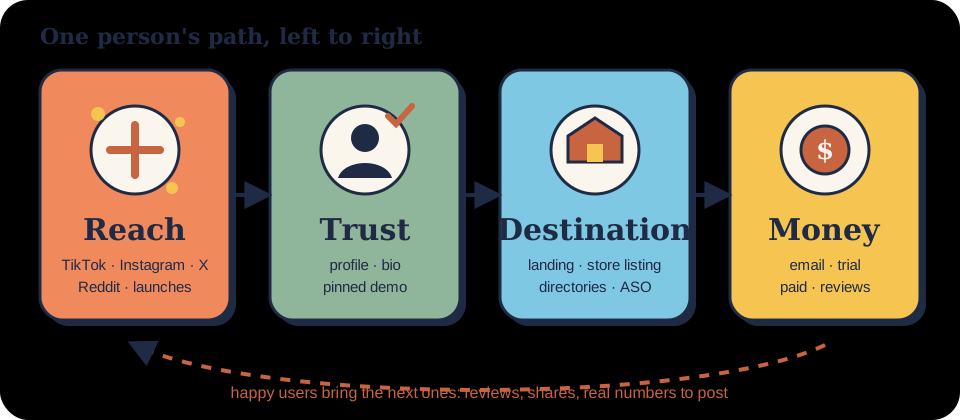
6. Grow an audience: social and email

Part
🧠 Skills social-credible-posting → social-build-in-public → social-short-video · email-segments-and-tools
🔎 Research Your product's "wow moment" on screen, which platform your users watch, where your contacts come from
🛠️ Tools Built-in screen recorders · any free video editor · an email tool chosen in email-segments-and-tools
📚 References FTC Endorsement Guides FAQ · TikTok Branded Content Policy · Gmail sender guidelines
📄 Templates Weekly update in social-build-in-public · growth/email-segments.md
💬 Prompt Short video · Credible posting · Email segments
✅ You end with One video format that brings installs, a weekly posting habit, and followers moving to a segmented email list you own

7. Grow in stores: the ASO loop

Part
🧠 Skills Playbook: ASO Optimization: keywords → title → screenshots → reviews & ratings
🔎 Research Your weakest funnel step: impressions, page views or conversion (28-day baseline)
🛠️ Tools App Store Connect App Analytics · Play Console Store performance · Product Page Optimization / store listing experiments
📚 References App Store Connect Help · Play Console Help
📄 Templates growth/aso-log.md (format in the playbook)
💬 Prompt Review & rating strategy
✅ You end with One change per month, logged with before/after numbers

8. Share results: write a case study

Part
🧠 Skills case-study-write-your-own
📄 Templates case-study-template.md
💬 Prompt Write your own

One prompt for the whole map

Paste this into any AI chat to find where you are and what to do next.

You are a growth coach for small digital products. Use this 9-chapter map:
0 Set the target (strategy) · 1 Research · 2 Learn from others · 3 Get paid · 4 Publish (listing) · 5 Launch ·
6 Grow an audience (social + email) · 7 Grow in stores · 8 Share results.

My product: {{what it is, who for, where it lives (App Store, Google Play, web, Chrome Web Store...)}}
Stage: {{idea / building / launched < 3 months / launched longer}}
Numbers: {{users or downloads per week, revenue if any}}
Target: {{$X by <date>, or "none yet"}}
Done so far: {{e.g. keyword sheet, pricing, listing submitted}}
What feels most broken: {{...}}

1. Tell me which chapter I'm in and why, in two sentences.
2. List what's missing from that chapter as a checklist: files to create, research to do, official docs to check.
3. Give me the single next task I can finish in under an hour, and what file I'll have at the end.
Don't invent facts about my product; mark unknowns as TODO.

Keep it in your repo

Save every output next to your code, one folder per chapter: growth/revenue-target.md, research/, growth/pricing.md, growth/listing.md, growth/screenshots.md, growth/LAUNCH.md, growth/aso-log.md. Your AI agent can read them next session and pick up where you left off.