Pinterest Marketing for Indie Devs
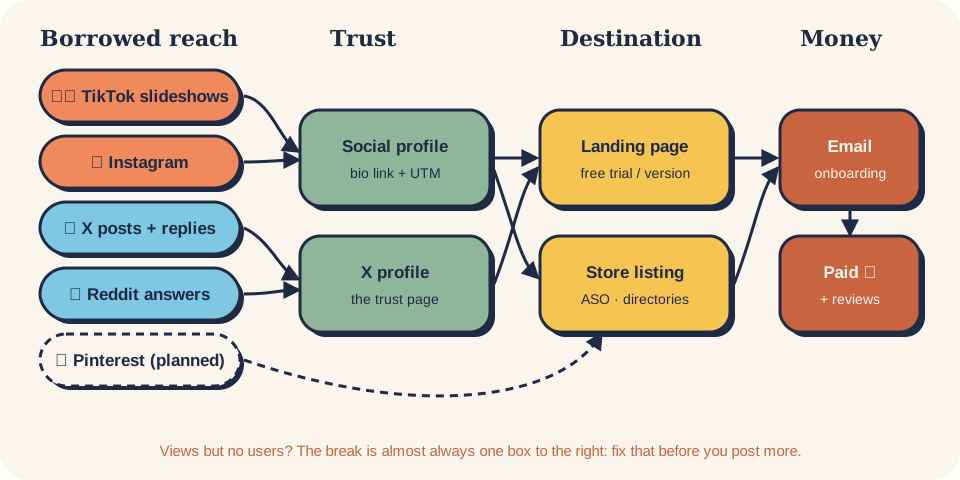
Part of Marketing & Social: every channel kit and how they link to each other.
Pinterest is a search engine made of pictures, and a pin keeps working for months. People come to plan something: a desk setup, a study system, a budget, a wedding, a content calendar. A tall pin that shows the result and links to a page that helps them do it reaches people searching for that plan, long after you posted it. Every fact here cites Pinterest's own help, policy or investor pages, or is labelled as practice to test.
someone searches a plan  →  tall pin showing the result  →  your how-to page / landing (UTM)  →  email or trial  →  paid
                         ↘  saves put the pin on their boards, where it keeps being found
One command
/social-pinterest today          → this session's batch: which pins to make, for which page and board
/social-pinterest keywords <topic> → search words people use, from autocomplete and Pinterest Trends
/social-pinterest pin <page URL>  → 3–5 fresh pins for one page: image brief, title, description, board, link
/social-pinterest boards          → 5–10 boards named for searches, with descriptions
/social-pinterest profile         → business account, claimed website, name, bio, cover
/social-pinterest numbers         → weekly table: impressions, saves, outbound clicks, visits, signups
/social-pinterest fit             → is Pinterest worth it for this product? (yes / test / no, with why)
/social-pinterest risk            → link blocked, pins hidden, account suspended? what happened and what to do
Router skill: social-pinterest. Installed as a plugin the command is
/product-growth-hack:social-pinterest today; or copy the skills/social-pinterest* folders into ~/.claude/skills/.
Start in 3 steps
- Today (30 min): check the fit, switch to a business account, claim your website, name 5 boards after searches → docs/01-strategy.md · docs/02-profile-setup.md.
- This week (1 hour): pick 3 pages on your site worth landing on (a how-to, a template, the landing), find their search words, and make 3 different pins for each → social-pinterest-pin.
- Every week after (≈1 hour, one sitting): 5–10 new pins, spread over the week, plus 10 minutes of numbers on Sunday → flow/weekly-flow.md. Judge it at 90 days, not 9.
What's in this folder
| Folder | What's inside |
|---|---|
| docs/ | The method, one topic per file (below) |
| flow/ | The weekly batch, the Sunday numbers and the monthly refresh |
| skills/ | social-pinterest (router) · social-pinterest-pin (pins for one page) |
| templates/ | Pin file · keyword sheet · board plan · weekly numbers |
| reference/ | Facts with sources: pin specs, claiming, Trends, analytics, rules, users |
Already in the main library, used by this kit: social-credible-posting (the proof behind every claim) · aso-screenshot-strategy (one image, one message) · email-list-and-deliverability (where the visitors should end up).
Docs, in reading order
- Strategy: is Pinterest for your product?
- Profile setup: business account, claimed site, boards
- How Pinterest search works, in plain words
- Keywords and boards
- Pin design
- Pin variants: 8 kinds of pin for software
- Metrics and stop rules
- Rules and risks
Five things to remember
- A pin is a door to a page. No page worth landing on, no Pinterest. Build the page first.
- Write for search: the words people type go in the first 40 characters of the title and in the board name.
- Make new images, don't re-save the same pin. Five different pins to one page beat one pin saved five times.
- Pinterest is slow and long. Measure monthly; a pin's best month can come long after the day you posted it.
- UTM on every destination link (
utm_source=pinterest&utm_medium=pin), or you'll never know which pin brings buyers.