TikTok Slideshow Marketing for Indie Apps
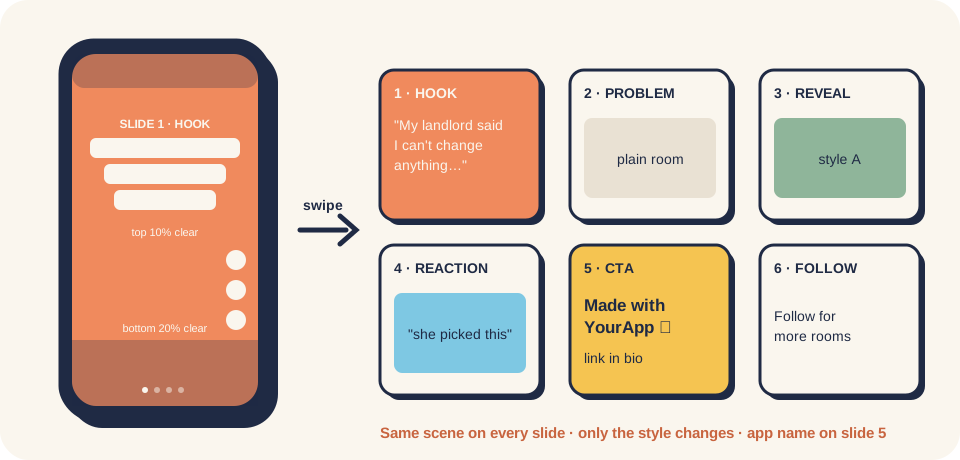
Part of Marketing & Social: every channel kit and how they link to each other.
Post 6-image photo-mode slideshows about a human moment your product creates, send them to TikTok as drafts, add a sound by hand, publish, and let the numbers decide which hook to repeat. This is the "Larry loop" that took one indie dev's apps from near zero to a few hundred dollars of MRR in a week (self-reported, see the case study), written down so anyone can run it, with or without an AI agent.
research niche → write hook → 6 slides (same scene) → draft to TikTok → add sound + publish
      ↑                                                                          │
      └──── keep / retest / drop the hook  ←  views · saves · profile visits · installs · paid
Why slideshows (and why people call it "wild")
- Cheap per post. Six images and six short lines. The reported API cost was about $0.50 per post ($0.25 with batch generation) and ~60 seconds of human time (case study).
- Many shots on goal. 1–3 posts a day is realistic, so you find a winning hook in days, not months.
- No face, no filming. The format is text over pictures. That fits apps where the result is visual (rooms, faces, outfits, food, before/after, a game moment) and founders who won't be on camera.
- The hook is the whole game. In the Larry data, hooks about another person + doubt → shown the result → changed their mind got 147K–234K views; hooks about the app or its features got under 3K.
What's not proven: claims like "slideshows get 5× the reach of video" come from vendor blogs without data. See reference/research-2026-10-12-tiktok-slideshow.md.
Start in 3 steps
- Today (60 min): read docs/01 and docs/02,
then run
social-tiktok-slideshowto get 10 hooks and your first 3 slideshows (slides, image prompts, caption). - This week: use the account like a normal viewer first (docs/07), then post 1–3 slideshows a day by hand or from drafts. Log every post in templates/post-log.csv.
- Every Sunday (20 min): run
social-tiktok-slideshow-loopon the log. It tells you which hooks to scale, keep, retest or drop, and which slide to fix (hook or CTA).
What's in this folder
| Folder | What's inside |
|---|---|
| docs/ | The method, one topic per file (below) |
| case-studies/ | Larry × Snugly (the reference case) · 3 posts a day for a Quran app · other founders using slideshows |
| reference/ | Research log with sources · skills, repos and tools · TikTok photo-post API facts |
| templates/ | Hook bank · one slideshow post · post log (CSV) |
| skills/ | social-tiktok-slideshow (make the posts) · social-tiktok-slideshow-loop (read the numbers, with a script) |
Docs, in reading order
- What a TikTok slideshow is, and which products it fits
- The slideshow loop, step by step
- Hooks: the formula, what worked, what flopped
- Slide design: sizes, safe zones, text, keeping the scene the same
- Posting: drafts, sound, captions, cadence
- Metrics and the decision table
- Rules and risks: AI labels, ad disclosure, many accounts, automation
Five things to remember
- Write about a person and a moment, not your app. The app name goes on the CTA slide and in the caption.
- Same scene on all 6 slides. Lock the room / face / object description; change only the style.
- Drafts, then a sound by hand. The API can't pick trending audio; that last 60 seconds is yours.
- Measure to money. Views alone lie. High views + no installs = fix the CTA; few views + good installs = fix the hook.
- Label AI images and disclose that you're promoting your own app. It's TikTok's rule and it protects the account.
Keep it current
- Monthly: re-check the Content Posting API photo reference, Community Guidelines and Branded Content Policy; update reference/ with the date.
- New research goes in
reference/research-YYYY-MM-DD-<topic>.md. New cases go incase-studies/.