Marketing & Social: every channel, and how they link
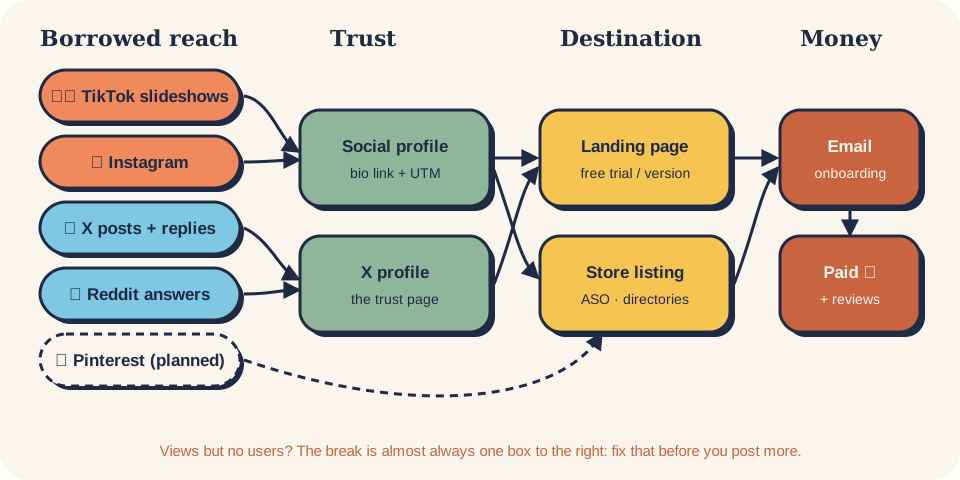
Each social channel borrows strangers' attention. Profiles turn it into trust. Your landing page, store listing
and email list turn trust into users and money. This page maps every channel kit in marketing/ and every
channel skill in skills/ onto that one chain, so you know where each fits, what it hands to the next step, and
which to start with.
borrowed reach            trust                     owned destination              money
TikTok · Instagram · X  →  profile · pinned post  →  landing · store listing  →  email · trial  →  paid
Reddit · communities       bio link + UTM            directories · ASO             onboarding        ↺ reviews, shares
The kits in this folder
| Channel | Kit | Start with | Content unit | Best for | Status |
|---|---|---|---|---|---|
| 🐦 X (Twitter) | x-marketing/ | /social-x |
Short post + reply | Makers, early adopters, dev tools | Live |
| instagram-marketing/ | /social-instagram |
Carousel, Reel, Story | Non-developer buyers, Mac / iPhone users, creators | Live | |
| 🎞️ TikTok slideshows | tiktok-marketing/ | social-tiktok-slideshow |
6-image photo-mode post | Consumer apps with a visual result or an emotional moment | Live |
| reddit-marketing/ | /social-reddit |
Answer (comment), then a post in the subreddit's format | Users asking for a tool like yours; Mac / dev / niche buyers | Live | |
| ✍️ Medium | medium-marketing/ | /social-medium |
Long article (or your blog post, mirrored) | Dev tools, AI / SaaS / productivity; support channel, not for games | Live |
| pinterest-marketing/ | /social-pinterest |
2:3 pin → how-to page / landing | Planners: templates, study, design, home; evergreen search traffic | Live |
Every kit has the same layout: README-<Channel>-Marketing.md, docs/ (the method), reference/ (sources and
research log), templates/, skills/, plus case-studies/, flow/ or posts/ where the kit has them.
1 · The whole map
flowchart LR
    subgraph REACH["Borrowed reach (strangers)"]
        TT["TikTok slideshows"]
        IG["Instagram<br/>carousels · Reels"]
        X["X posts + replies"]
        SV["Short video<br/>TikTok · Reels · Shorts"]
        RD["Reddit answers<br/>(reddit-marketing)"]
        MD["Medium articles<br/>(medium-marketing)"]
        CM["Communities<br/>Discord · IH · HN"]
        PH["Launch sites<br/>Product Hunt"]
        PI["Pinterest pins<br/>(pinterest-marketing)"]
    end
    subgraph TRUST["Trust (they check you're real)"]
        PR["Social profiles<br/>bio · pinned demo"]
        XP["X profile<br/>the trust page"]
        GH["GitHub README"]
    end
    subgraph OWN["Owned destination"]
        LP["Landing page<br/>free trial / free version"]
        ST["Store listing<br/>App Store · Play · Chrome · Mac"]
        DIR["Directories"]
        SEO["Search: ASO + intent pages"]
    end
    subgraph MONEY["Capture → money"]
        EM["Email list<br/>onboarding · trial"]
        PAY["Paid"]
    end
    TT --> PR
    IG --> PR
    SV --> PR
    PI -.-> LP
    X --> XP
    RD --> XP
    MD --> LP
    CM --> XP
    PR --> LP
    PR --> ST
    XP --> LP
    GH --> LP
    PH --> LP
    DIR --> ST
    SEO --> ST
    SEO --> LP
    LP --> EM
    ST --> EM
    EM --> PAY
    PAY -. "review · share · UGC" .-> ST
    PAY -. "real numbers to post" .-> X
How to read it: left to right is one person's path. Each arrow is a link you must put in place (a bio link, a pinned post, a CTA slide, a store URL), always with a UTM tag (UTM map).
| Layer | Its only job | Kits / skills |
|---|---|---|
| Reach | Make strangers stop and care | TikTok, Instagram, X kits · short video · Reddit · Product Hunt · first 100 users |
| Trust | Prove you're real and the product works | X profile funnel · Instagram profile setup · credible posting · build in public · GitHub seeding |
| Destination | One clear next step | Store listing by niche · free directories · ASO · screenshots |
| Capture → money | Keep them and turn them into paid | Email list · onboarding · trial emails · paywall |
A channel that gets views but no users is almost always a broken link after it: profile, landing or store page. Fix the next layer before you post more.
2 · One fact, every channel (repurposing)
You don't need new ideas per channel. You need one true fact per product (a feature, a number, a user story) and one adapter per channel.
flowchart TD
    F["One true fact<br/>fact bank per product"] --> XA["X: post + demo clip<br/>first-reply link"]
    F --> IA["Instagram: 6-slide carousel<br/>+ 3-frame link Story"]
    F --> TA["TikTok: 6-image slideshow<br/>person + doubt hook"]
    F --> RA["Reddit: a useful answer<br/>where someone asked"]
    F --> MA["Medium: the long how-to<br/>product once, disclosed"]
    F --> LA["Store listing / landing:<br/>a screenshot caption"]
    F --> PA["Pinterest: 3–5 pins<br/>to a how-to page"]
    XA & IA & TA & RA & MA & PA --> NUM["Weekly numbers<br/>per channel"]
NUM -- "winner" --> F| Fact type | X | TikTok slideshow | Listing / landing | |
|---|---|---|---|---|
| Visual result (before → after) | Demo clip | Carousel: before, steps, after | 6 slides, locked scene, person + doubt | Screenshot 1 |
| A number (time saved, users) | Number with context | Single image + caption | Hook: "My boss said…" + the number | Subtitle / proof line |
| A user story | Quote + reply to them | Carousel: their problem → result | "My mum couldn't…, so I showed her" | Review / testimonial (real only) |
| A how-to tip | Tip without product | Checklist carousel | Hook → 3–5 tips → CTA | Help page / intent page |
Templates: X fact bank · Instagram carousel brief · TikTok slideshow post and hook bank.
3 · Which channel first?
flowchart TD
    Q1{"Who buys?"} -->|"Developers / makers"| XQ["X + GitHub + Reddit<br/>→ x-marketing"]
    Q1 -->|"Businesses"| B2B["Cold email + LinkedIn<br/>→ skills/email"]
    Q1 -->|"Consumers"| Q2{"Can a still image<br/>show the value?"}
    Q2 -->|"Yes: result, face, room, quote"| TTQ["TikTok slideshows<br/>→ tiktok-marketing"]
    Q2 -->|"Yes, and they're on Instagram<br/>(Mac / iPhone users, creators)"| IGQ["Instagram<br/>→ instagram-marketing"]
    Q2 -->|"No, it must be seen moving"| SVQ["Short video<br/>→ social-short-video"]
    XQ & B2B & TTQ & IGQ & SVQ --> L["Then: listing + landing + email<br/>must be ready before you scale"]
Rules of thumb: - One main channel for 3 weeks, one support channel at most. Add the next only when the first has a weekly routine you keep without thinking. - Before any channel: the store listing (listing by niche) and landing must convert, and there must be an email capture (pre-launch checklist). - X is the trust page for everything else when your buyers are makers: Reddit and email signatures point there (cross-channel funnel). - Instagram and TikTok are reach for consumers; they send people straight to the landing or store, not to X (Instagram website funnel).
4 · One UTM map for every channel
Same pattern everywhere so one GA4 report compares channels: utm_source=<channel>&utm_medium=<surface>&utm_campaign=<product or post>.
| Channel | utm_source |
utm_medium examples |
Where the link lives |
|---|---|---|---|
| X | x |
bio, reply, post |
Bio, first reply under a post |
instagram |
bio, story, dm |
Bio links, Story link sticker, DM | |
| TikTok | tiktok |
bio |
Bio only (caption links aren't clickable) |
reddit |
comment, profile |
Profile social links, comments where allowed | |
| Medium | medium |
article, profile |
Last paragraph of an article, profile about page |
email |
signature, onboarding, trial |
Signatures, sequences | |
| Directories / launch sites | <site> |
listing, launch |
The listing page |
pinterest |
pin, profile |
The pin's destination link (utm_content=<variant>), profile website |
App stores strip most UTMs. For iOS use App Store Connect campaign links (ct=), for Google Play the referrer
parameter, and count installs per day per channel.
5 · One week, all channels (solo founder)
Illustrative example. A plan for one person with ~6 hours a week; adjust to your main channel.
| Day | Main channel (pick one) | Support | Destination / money |
|---|---|---|---|
| Mon | 1–3 TikTok slideshows or 1 Instagram post or 2 X posts | 10 min Reddit answers | — |
| Tue | same | X replies 15 min | — |
| Wed | same | — | Fix one thing on the store listing or landing |
| Thu | same | Reddit answers | — |
| Fri | same | X replies | Check email sequence opens |
| Sat | batch next week's posts from the fact bank | — | — |
| Sun | weekly numbers per channel: X · Instagram · TikTok loop · Pinterest | — | Installs, trials, paid by utm_source |
6 · Same numbers in every channel
reach (views / impressions) → engaged (saves · shares · replies) → profile visits → link clicks → installs / trials → paid
| Weak step | Usual cause | Fix with |
|---|---|---|
| Reach | Hook / first line | TikTok hooks · Instagram image flow · X post variants |
| Profile visits | Post doesn't point anywhere | CTA slide with the product name · pinned post |
| Link clicks | Bio / pinned post | X profile funnel · Instagram profile setup |
| Installs | Store page or landing | ASO screenshots · listing by niche |
| Paid | Onboarding / paywall | Trial emails · paywall design |
7 · Rules that apply on every channel
- Disclose that you made or are paid to promote the product (TikTok, Instagram and X each have a setting or rule; FTC in the US). Details per kit: X · Instagram · TikTok.
- Label realistic AI images. Never present an AI result as a real customer or a real photo.
- No fake engagement, no account networks run by one person or a bot. Extra accounts are fine only as real, disclosed voices.
- Never invent proof. How to spot fake revenue screenshots: fake proof and scams.
Folder map
marketing/
├── README-marketing-social.md      ← this page: the map and how channels link
├── x-marketing/                    X: daily posts, replies, profile funnel, Premium
├── instagram-marketing/            Instagram: 10-step image flow, Stories, growth engine, creators
├── tiktok-marketing/               TikTok: photo-mode slideshows, the Larry loop, case studies
├── reddit-marketing/               Reddit: answers first, posts later, subreddit wiki
├── medium-marketing/               Medium: fit check, reader-first articles, canonical links, publications
└── pinterest-marketing/            Pinterest: search-term boards, fresh pins to your pages

skills/  (channel-neutral skills these kits link to)
├── social/     short video · credible posting · build in public
├── launch/     Reddit · Product Hunt · first 100 users · GitHub seeding
├── listing/    store listing by niche · free directories
├── aso/        keywords · title · screenshots · ratings
└── email/      list · onboarding · trial · cold outreach
Adding a channel kit
- Create
marketing/<channel>-marketing/with the layout above (no empty folders; mark missing parts planned). - Skills go in
marketing/<channel>-marketing/skills/<area>-<task>/SKILL.md; the validator picks them up. - Add them to
.claude-plugin/marketplace.json, the social README, the router in skills/growth, the root README, and a row + arrows on this page.