TikTok Slideshow Loop: Let the Numbers Pick the Next Hook
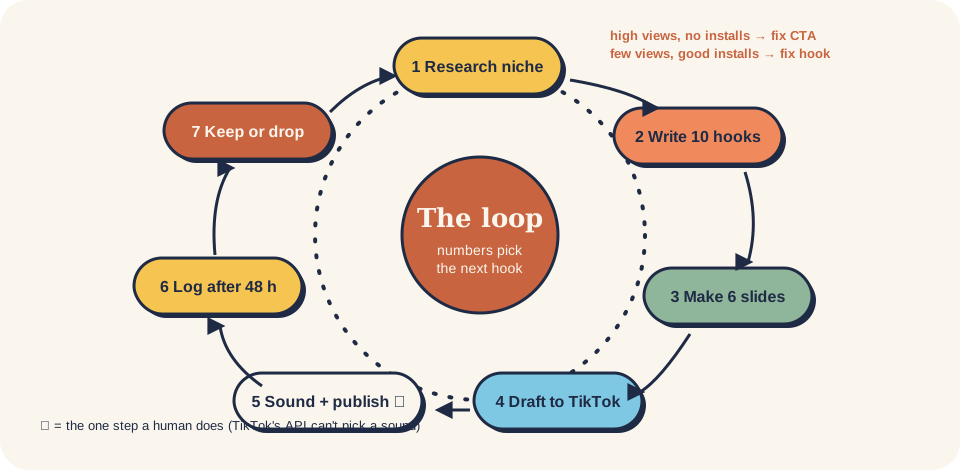
Reads a week of TikTok slideshow results and decides what to post next, using the "Larry loop" decision table - high views but few installs means fix the CTA slide, few views but good installs means fix the hook, both low means a new formula, both high means scale. Includes a standard-library Python script that turns a post-log CSV into a Markdown report with a fix per post and a scale / keep / retest / drop verdict per hook formula, plus stop rules.
A weekly report that says, for every post, which slide to fix, and for every hook formula, whether to scale, keep, retest or drop it.
Goal
Posting is cheap; deciding is where the growth comes from. The Larry setup logged every post with views and revenue and rewrote hooks or CTAs from that log (case study). This skill does the same in 20 minutes a week, by hand or with the script, so next week's 7–21 posts double down on what earned installs.
When to use
- You've posted 7+ slideshows and have numbers at least 48 hours old.
- Views are fine but installs aren't (or the reverse) and you don't know what to change.
- Not for: making the posts → social-tiktok-slideshow. Installs are fine but nobody pays → monetization-paywall-design.
Inputs
- post-log.csv with one row per post:
date, hook, formula, cta, views, saves,
  shares, profile_visits, link_clicks, installs, paid
(empty cells are fine). - Views, saves, shares, profile visits from TikTok analytics; link clicks from your UTM link; installs from App Store Connect / Play Console / attribution; paid from RevenueCat / Stripe / the store.
Steps
- Fill the log (10 min). Only posts at least 48 h old. If installs can't be split per post, put the day's installs on that day's best post and note it, or compare whole days.
- Run the report.
python3 scripts/slideshow_loop.py ../../templates/post-log.csv --high-views 10000 --last 30--high-viewsis what "high" means for your account; start at 10,000 and raise it once your median passes it. Try it on the made-up sample first:python3 scripts/slideshow_loop.py scripts/illustrative-post-log.csv. - Read the per-post column (docs/06):
| Views | Installs per 1K views vs. your median | Do next |
|---|---|---|
| High | Below | Fix CTA: slide 5 names the app, one action, shows the result again |
| Low | Above | Fix hook: new person / conflict on slide 1 |
| Low | Below | Fix both: new formula and new CTA |
| High | Above | Scale |
| 4. Read the per-formula verdicts (best views): ≥ 50K scale (3–5 variations), 10K–50K keep (new scene), 1K–10K | ||
| retest once, < 1K on 2+ posts drop. These thresholds come from one consumer-app niche; adjust after 4 weeks. | ||
| 5. Write next week. Variations of every scale formula first, one new formula to test, nothing from drop. | ||
| Update the hook bank with the verdicts. Make the posts with | ||
| social-tiktok-slideshow. | ||
| 6. Check the stop rules. 20+ posts and nothing over 10K → change the niche angle. Views but zero installs after | ||
| 2 weeks of CTA fixes → check the bio link on a phone and the store page. Every post suddenly near zero → check | ||
| the account status and docs/07 before posting more. |
Prompt (copy-paste)
Works in Claude, ChatGPT, Gemini, Cursor. Replace everything in {{ }}.
You are reviewing a week of TikTok slideshow posts for {{product}} using the "Larry loop".
Here is my post log (CSV: date, hook, formula, cta, views, saves, shares, profile_visits, link_clicks, installs, paid):
{{paste CSV}}

"High views" for my account means at least {{10000}} views.
1. For each post, compute installs per 1K views and compare with the median of all posts. Classify:
   high views + below-median installs = FIX CTA; low views + above-median = FIX HOOK; both low = FIX BOTH;
   both high = SCALE. One-line reason each.
2. Group by formula. Verdict by best views: >=50K scale, 10K-50K keep, 1K-10K retest, <1K on 2+ posts drop.
3. Tell me the single biggest leak this week (hook, CTA, store page or paywall) and why, citing the numbers.
4. Write next week's plan: {{7-21}} hooks - variations of every SCALE formula first (same shape, new person/scene),
   one new formula to test, nothing from DROP. For each FIX CTA post, rewrite slide 5 with the app name and one action.
5. Check the stop rules: 20+ posts with none over 10K views; views with zero installs after 2 weeks; sudden drop to
   near zero on every post.
Use only the numbers I gave you. If a column is empty, say what you can't conclude.
Example output
Illustrative example. Numbers are made up (the bundled scripts/illustrative-post-log.csv).
| Formula | Posts | Best views | Verdict |
|---|---|---|---|
| F1 person+doubt | 3 | 71,500 | scale |
| F3 feeling | 1 | 6,400 | retest |
| F5 self joke | 1 | 1,300 | retest |
| F4 feature | 2 | 940 | drop |
Per post: "My mum said short hair is a mistake…" had 71,500 views but 0.31 installs per 1K (median 0.85) → fix CTA: the app name wasn't on slide 5. "I couldn't decide before my wedding…" had 6,400 views but 2.97 per 1K → fix hook: the right people, too few of them; retest with a person + doubt.
Next week: 5 variations of F1 (new person: coach, best friend, hairdresser, dad, flatmate), one retest of F3 with a second person added, F4 stopped. Slide 5 on every post: "Made with Fringe · try your face · link in bio".
Common mistakes
- Deciding on day 1. Slideshows keep getting views for days. Wait 48–72 h before logging.
- Only logging views. Views without installs can't tell a hook problem from a CTA problem.
- Changing hook and CTA at once on a post that only had one problem. Fix the slide the table points to.
- Treating Larry's thresholds as law. They're from one niche; recalibrate
--high-viewsand the verdict lines to your own medians after a month. - Blaming TikTok when installs don't pay. That's onboarding or paywall work, not content.
Related skills
- social-tiktok-slideshow: make next week's posts from the plan.
- monetization-paywall-design: installs but no paid users.
- aso-screenshot-strategy: clicks but no installs.
Credits
Written by @nvminhtu. Decision table and thresholds from Oliver Henry's Larry skill (ClawHub, Stack Junkie).