TikTok Slideshows: Cheap Posts, Many Hooks, One Winner
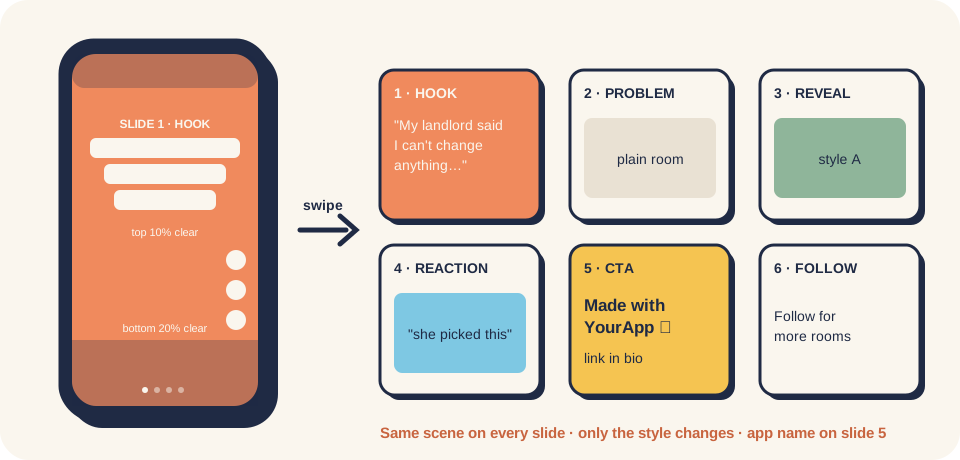
Makes TikTok photo-mode slideshows that bring installs for an app, game or AI product, using the "Larry loop" that got an indie dev's apps 500K+ views in 5 days (self-reported). Checks the product fits, mines hooks from the niche, writes 10 hooks in the "another person + doubt → showed them → changed their mind" shape, then builds ready-to-post slideshows - 6 slides with on-slide text, one locked scene description and 6 image prompts, the CTA slide with the app name, a caption with at most 5 hashtags - plus the draft → add sound → publish steps, AI and promotion labels, and a post log row.
10 hooks and 3 ready-to-post 6-slide slideshows (text, image prompts, caption), plus the routine to post 1–3 a day and log them.
Goal
A slideshow costs a few minutes and well under a dollar, so you can test many hooks fast. In the reference case the same pipeline got 147K–234K views with "person + doubt" hooks and under 3K with feature hooks (case study). This skill gets you to your first batch of posts built on the shape that won, with the safety rules in place, so the numbers can tell you what to repeat.
When to use
- The product makes a visible result (room, face, outfit, body, food, game moment) or an emotional moment (quotes, relationships, faith, study stress). Fit check: docs/01.
- You won't film yourself, or want more posts than video allows.
- Not for: live demos and screen recordings → social-short-video. Reading last week's numbers → social-tiktok-slideshow-loop. B2B / dev tools with no visual result → social-credible-posting.
Inputs
- Product name, one-line promise, who it's for, and the store or landing link (with
utm_source=tiktok). - What the result looks like: 3–6 real outputs of the product (screenshots, generated images) if you have them.
- A TikTok account you'll publish from (one per product or one founder account).
- Optional: an image model with commercial-use terms; a scheduler or the TikTok API for drafts.
Steps
- Fit check (5 min). Write the before → after or the moment in one line. If you can't show it in a still image, stop and use social-short-video.
- Research the niche (20 min). Search TikTok with your users' words, last 30 days, top slideshows. Save 10: slide-1 text, slide count, views, account size. Skip one-hit accounts. Tool option: swipekit. Log shapes in the hook bank.
- Write 10 hooks. Use the formula in docs/03: a specific person + doubt/rule → "so I showed them" → the result. ≤ 12 words, no app name, no "Did you know". Pick 3 to post first, from at least 2 different formulas.
- Lock the scene. One paragraph: what stays the same on all slides (room layout, face, camera angle, light), plus "iPhone photo, realistic lighting, no text, no watermark, no logo". Best source: your own app's real output.
- Write 6 slides per post with the skeleton hook → problem → reveal → reaction → CTA with the app name → follow. 4–6 words a line, ≤ 4 lines. For quote/feeling apps, 3 slides is fine: hook → message → CTA.
- Make the images and text. Portrait only (1024×1536 or 1080×1920), text centred ~28% from the top, top 10% and bottom 20% clear (docs/04). Regenerate any slide where the locked parts moved.
- Caption. 2–4 sentences continuing the story, app named once, "link in bio", ≤ 5 hashtags, different every time.
- Draft → sound → publish. Upload as a draft (app, scheduler, or API
MEDIA_UPLOAD/SELF_ONLY), then in the TikTok app add a sound you may use, switch on the AI-generated label for realistic AI images and the promotional content disclosure, publish (docs/05, docs/07). - Log it. After 48–72 h, one row in post-log.csv. Sunday: run social-tiktok-slideshow-loop.
Cadence: use a new account like a normal viewer for a few days first (practice, not a TikTok rule). Week 1: one post a day. Weeks 2–3: 2–3 a day across 3+ formulas. Never use bots, bought views or networks of fake accounts.
Prompt (copy-paste)
Works in Claude, ChatGPT, Gemini, Cursor. Replace everything in {{ }}.
You are a TikTok slideshow marketer for indie apps. You follow the "Larry loop": hooks about a specific person who
doubts something, then is shown the result and changes their mind, beat hooks about the app or its features.

Product: {{name}} — {{one-line promise}}
Audience: {{who, age, country}}
What the result looks like: {{e.g. the same room redesigned in different styles / a verse with an explanation}}
Link in bio: {{store or landing URL with utm_source=tiktok}}
Viral slideshows I saved in this niche (slide 1 text · views · slides): {{paste, or "none"}}

Do this:
1. Fit check: in one line, the before → after or the moment a still image can show. If none, say so and stop.
2. From my saved slideshows (if any), name the 3 hook shapes that repeat and why they work.
3. Write 10 hooks: max 12 words, a specific person (mum, landlord, sister, coach...) + doubt or rule + the reveal.
   No app name, no "Did you know", no feature lists. Tag each with a formula ID (F1, F2...) and the emotion.
4. Pick the 3 best (from at least 2 formulas). For each, output:
   - LOCKED SCENE: one paragraph that stays identical in every image prompt (layout, camera angle, light, sizes),
     ending with "iPhone photo, realistic lighting, natural imperfections, no text, no watermark, no logo".
   - SLIDES: a table of 6 rows (hook, problem, reveal, reaction, CTA with "{{name}}", follow): on-slide text with
     manual line breaks (4-6 words a line, max 4 lines) and what changes in the image versus the locked scene.
     For a quote/feeling product, 3 slides (hook, message, CTA) is allowed.
   - IMAGE PROMPTS: 6 prompts, each = LOCKED SCENE + one style line, portrait 1024x1536.
   - CAPTION: 2-4 sentences continuing the story, the app name once, "link in bio", max 5 hashtags.
5. A checklist before publishing: locked parts identical, text inside the safe zone (centre ~28% from top, top 10%
   and bottom 20% clear), app name on the CTA slide, sound added in the app, AI-generated label on for realistic AI
   images, promotional content disclosure on.
Never invent results, reviews or testimonials. If an image shows an AI result, the text must not claim it is real.
Example output
Illustrative example. Product and numbers are made up to show the format.
Product: Fringe, an AI hairstyle preview app. Hook (F1, doubt → surprise): "My sister said bangs / would ruin my face / so I showed her these"
| # | On-slide text | Image change vs. locked scene |
|---|---|---|
| 1 | My sister said bangs / would ruin my face / so I showed her these | Her face today, hair tied back |
| 2 | "Don't do it. / Trust me." | Same, unimpressed look |
| 3 | Curtain bangs | Same face, curtain bangs |
| 4 | She went quiet / at this one | Same face, wispy bangs |
| 5 | Made with Fringe / try your face first / link in bio | Wispy bangs, best angle |
| 6 | Follow for more / before the salon | Short bob |
Caption: "My sister has vetoed every haircut I've had since 2019. I ran my photo through Fringe and showed her four versions. She booked the salon for me. Link in bio if you want to try yours first. #bangs #hairinspo #haircutideas"
Common mistakes
- Hooks about the app ("See 20 styles before you commit"). In the reference case these got under 1K views. Put a person and a moment on slide 1; the app goes on slide 5.
- No app name on the CTA slide. Viewers who loved it can't find it. Name it on slide 5 and in the caption.
- The scene changes between slides. Lock it in one paragraph and paste it into every prompt.
- Landscape or tiny text. Portrait only; big text, nowhere near the top bar or the bottom caption.
- Skipping labels. Realistic AI images need the AI label; promoting your own app needs the disclosure.
- Many accounts run by one person or a bot. TikTok bans networks and automated account operation. One real account per voice.
- Judging by views. Log installs and paid users too, and decide with social-tiktok-slideshow-loop.
Related skills
- social-tiktok-slideshow-loop: weekly numbers → scale / keep / retest / drop.
- social-short-video: video formats when a still image can't show the value.
- aso-screenshot-strategy: the store page that the bio link lands on.
- Kit overview: TikTok marketing README. Outside skills and repos (Larry on ClawHub, SlideSmith, swipekit): tools-and-repos.md.
Credits
Written by @nvminhtu. Method from Oliver Henry's Larry skill and write-ups: gameplaydev Substack, Stack Junkie, ClawHub listing. API facts: TikTok photo-post reference. Full source list: research log.