02 · The slideshow loop, step by step
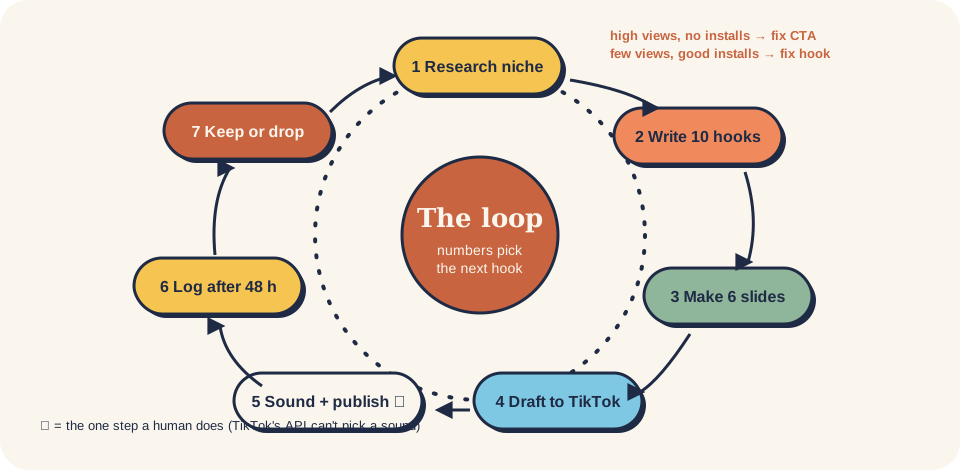
The loop below is the one Oliver Henry's agent "Larry" ran for Snugly and Liply (case study), plus the hook-mining step from the Postiz pipeline write-up. Each step has a manual way and an agent way. You can run the whole thing by hand; the agent only saves time.
1 research ─► 2 hook ─► 3 scene ─► 4 images ─► 5 text ─► 6 caption ─► 7 draft ─► 8 sound+publish ─► 9 log ─► 10 decide
                 ▲                                                                                              │
                 └──────────────────────────────── winners become formulas, losers get logged ◄─────────────────┘
| # | Step | Done when | By hand | With an agent |
|---|---|---|---|---|
| 1 | Research the niche | 5 accounts + 10 slideshows saved, each with views and slide count | Search TikTok for the words your users use; sort by most liked; note slide 1 text | A browser agent or swipekit (local MCP) measures accounts and pulls slides |
| 2 | Write hooks | 10 hooks in the hook bank, each ≤ 12 words, each about a person + a moment | Use the formula in 03 | Prompt in social-tiktok-slideshow |
| 3 | Lock the scene | One paragraph describing the room/face/object that stays identical on all 6 slides | Write it once, paste it into every image prompt | Same, saved in the post file |
| 4 | Make 6 images | 6 portrait images, same scene, no text baked in | Your own app's output (best: it's the real result), phone photos, or an image model | gpt-image or another model, ~3–9 min for 6 images |
| 5 | Add the text | Hook on slide 1, CTA with the app name on slide 5, all text inside the safe zone | Any editor (Canva, Figma, the TikTok text tool) | A canvas script (node-canvas, @napi-rs/canvas, PIL) |
| 6 | Write the caption | A 2–4 sentence story that names the app once, ≤ 5 hashtags | templates/slideshow-post.md | Prompt |
| 7 | Send as a draft | Post sits in your TikTok inbox/drafts | Upload in the app, save as draft | API MEDIA_UPLOAD mode, or a scheduler (Postiz, post-bridge) |
| 8 | Sound + publish | Live, with a sound you're allowed to use and the AI/commercial labels on | 60 seconds in the app | Can't be automated: the API doesn't pick sounds |
| 9 | Log it | One row in post-log.csv after 48–72 h | Copy numbers from TikTok analytics + your store / RevenueCat | Analytics API or scheduler stats |
| 10 | Decide | Each hook marked scale / keep / retest / drop; next week's 7–21 hooks written | 06 | social-tiktok-slideshow-loop runs slideshow_loop.py |
The 6-slide skeleton
From the Larry skill (Stack Junkie):
| Slide | Job | Example (room app) |
|---|---|---|
| 1 Hook | A person + doubt or conflict | "My landlord said I can't change anything so I showed her what AI thinks it could look like" |
| 2 Problem | Make the tension concrete | The plain room as it is today |
| 3 Reveal | The result | Same room, style A |
| 4 Reaction | The mind-change payoff | Same room, style B · "she asked for the link" |
| 5 CTA | One action, with the app name | "Made with Snugly · try your room" |
| 6 Follow | Soft reminder | "Follow for more rooms" |
Other skeletons that work for lists and quotes: hook → 3–5 tips → CTA (Postiz guide), or 3 slides hook → value → emotional CTA (Quran app case).
Time budget
| Setup | Per post | Per week |
|---|---|---|
| By hand, own photos | 20–40 min | 7 posts ≈ 3–4 h |
| Agent makes slides, you publish | ~60 s of yours + 15–30 min agent time | 21 posts ≈ 30 min of yours + Sunday review |
The per-post numbers for the agent route are Oliver Henry's (self-reported). Your first two weeks will be slower: he was still checking every post by hand early on.