Product Growth Hack

100% free AI growth skills, research templates and a free Markdown app for people building apps, extensions, games, plugins, templates and AI tools: growth strategy, research, case studies, store listing by niche, ASO, launch, social, monetization and email.





You can build the product. This repo helps with the part after that: finding out what users want, getting found, publishing on the stores, launching, growing an audience, and getting paid. Every skill is a short, step-by-step guide with a copy-paste AI prompt. Follow it in under an hour and you end up with something real: a keyword list, a launch plan, a price, a research report.
What you get (all free)
| What | Why it helps you | |
|---|---|---|
| 🧠 | 71 free AI growth skills | Strategy, research, case studies, store listing by niche, ASO, launch, social, monetization and email, each with a copy-paste prompt for Claude, ChatGPT, Gemini or Cursor. Or follow the steps by hand. |
| 🔎 | A tidy research system | Where to find trustworthy sources, where users ask for software (with links), how to mine competitor reviews, and templates to keep notes, sources and decisions organized in Markdown. |
| 🗺️ | Step-by-step playbooks | A 6-week route from "almost ready" to your first 100 users, and a 4-week ASO route with a monthly measurement loop, built from the skills. |
| 📖 | A free app to read it all | Markdown Everywhere (Mac & Windows) shows this repo, or your own research folder, as a table, a link map or Finder-style folders. Downloads and install steps: GitHub. |
No sign-up, no paywall, no email list. MIT licensed: use it, fork it, teach with it.
Who it's for
Indie developers, solo founders and small teams building apps, SaaS, games, AI tools, plugins, websites or browser extensions, especially if you're a builder, not a marketer.
Why use this instead of blog posts or courses
- Actionable. Each skill is one task, under an hour, with a concrete output. No theory dumps, no "10 generic tips".
- Works with any AI, or none. Copy the prompt into any chat, install the skills in an AI agent, or follow the steps yourself.
- Honest. Store rules cite official sources. Example numbers are real, or clearly labelled Illustrative.
- Yours. Everything is plain Markdown you can copy into your own repo, where your AI agent can read it next time.
New here? Start in 3 steps
- Find your situation in the table below. Not sure? Start with
growth: 4 questions, one next step. Starting from zero and want the order of steps to the first sale? Follow the Product Growth Hack flow. Want the whole picture? The Growth Map lays out 9 chapters, each with its skills, research, tools, official references, templates and prompt. - Open the skill and copy its Prompt block into your AI chat. Fill in the
{{ }}parts. - Follow the steps and save the result as a
.mdfile in your project, so you can build on it later.
| You want to… | Start here |
|---|---|
| Make $X in N months, and know every week if you're on track | Revenue Target → Spend and Timing |
| Stop copying what every competitor does | Contrarian Marketing |
| Turn several small apps or games into one long-term audience | Product as Funnel |
| Promote features before building them (mockups, design review) and show up in Google AI Overviews and ChatGPT; judge demand by daily traffic | GEO & AEO for Feature Previews, with a learning guide |
| Check an idea before building | Where Users Ask About Software → Review Mining |
| Learn from competitors ("learn from the enemy") | Competitor Teardown → Success Story Analysis |
| Learn design from Apple Design Award, Google Play Best of and Product Hunt winners | Award-Winning Design Study |
| Find facts you can trust | Source Finding |
| Stop losing research in tabs and chats | Research Doc Organization |
| Publish on the App Store / Google Play, step by step | App Store Listing · Google Play Listing |
| Publish a small product: extension, Mac app, game, plugin, AI tool, Notion template | Listing by niche |
| List the app for free in more places | Free Directories & Alternative Stores |
| Post on Reddit: which subreddits for a Mac app, extension, game, SaaS… and their rules | Reddit Posting by Product Type |
| Get users from Reddit every day: answer threads, mention your app without getting banned, one post a week | Reddit Marketing kit: start with /social-reddit · Reddit Answers |
| Is Medium worth it for my product? Write articles that bring readers to my site, republish my blog without hurting SEO | Medium Marketing kit: start with /social-medium fit · Medium Article |
| Get steady search traffic from pins: is Pinterest worth it, which boards, pins that link to my pages | Pinterest Marketing kit: start with /social-pinterest fit · Pins for One Page |
| Everything is ready (Pro version, landing page, payments), but how do I get the first sale? | Product Growth Hack flow: free hook → email list → beta → list-first launch |
| Launching soon | Playbook: Launch a Product, a 6-week route |
| Need downloads this week, with little time and no budget | Quick Download Wins, 16 channels ranked by effort |
| Get real stars and users for an open-source repo | GitHub Repo Seeding |
| Use a free repo to bring users to your paid product | Open-Source Funnel |
| Set up Firebase, Crashlytics, AdMob, consent and payments before launch, and check they work | Growth Stack Setup |
| Get users from TikTok, Reels or Shorts with fewer, better videos | Short Video |
| Post on X every day about what you built, use X Premium, get the first subscribers | X Marketing kit: start with /social-x · X Daily · X Growth · X Replies · X Profile Funnel |
| Get installs from TikTok slideshows (photo mode) without filming: cheap posts, many hooks, keep the one that sells | TikTok Marketing kit: TikTok Slideshow · Slideshow Loop · Larry × Snugly case |
| Post on Instagram with images that strangers send and save, and get website visits from it | Instagram Marketing kit: start with /social-instagram · Image Flow (10 steps) · Instagram Growth · Instagram DMs · Operator mode, 8 engines · Creators |
| Post on X, Threads or Facebook without sounding like a scam | Credible Posting → Build in Public |
| Reach the exact buyers by email (B2B), legally and without burning your domain | Cold Email Outreach |
| Send the right emails to free, paying and lapsed users; pick an email tool | Email Segments and Tools |
| Launched, but nobody's using it | Get Your First 100 Users |
| Get more installs from App Store / Google Play search | ASO Keyword Research, or the full Playbook: ASO Optimization |
| Get paid (Stripe not in your country? Vietnam, etc.) | Payment Setup: which provider works, what to prepare, how long it takes |
| Add in-app purchases: StoreKit 2, Play Billing or RevenueCat? | In-App Purchase Setup |
| Free repo or app: add a Sponsor / Ko-fi button | Open-Source Funding: FUNDING.yml, README support section, what stores allow |
| Start making money | Free Trial vs Freemium → Pricing Strategy |
Marketing channels, 1 → n
Every channel in one list: the tactic that works for small products, who it reaches, and the skill to run. Pick one or two, run them for 4 weeks, measure, then add the next. Not sure which? The action plan gives the order. How the social channels, listings and email link into one funnel (with diagrams): Marketing & Social map. Planned means the skill doesn't exist yet: claim it.
| # | Channel | Tactic | Reaches | Skills |
|---|---|---|---|---|
| 1 | 📧 Email: cold outreach | A narrow list with a visible trigger, a separate sending domain, 3–4 short emails | The exact business buyer, by name | Cold Email Outreach · List & Deliverability |
| 2 | 📧 Email: your own list | Waitlist → onboarding → trial → win-back, by segment | People who already said yes | Onboarding · Trial · Segments & Tools · Beta |
| 3 | Helpful posts in niche groups (after reading the rules), a page that looks real | Hobby and local communities, non-tech buyers | Credible Posting · Facebook groups: planned | |
| 4 | Founder posts with real numbers, then manual 1-to-1 conversations (no scraping tools) | B2B decision makers, recruiters, agencies | Credible Posting · Launch Posts · LinkedIn outreach: planned | |
| 5 | Answer existing questions daily; one rule-checked post a week in the right subreddit | Users actively asking for a tool like yours | /social-reddit · Reddit Answers · Reddit Posting · Where Users Ask |
|
| 6 | 🐦 X / Threads | Build in public: progress, numbers, lessons; on X, a daily rotation + Premium reply routine | Other makers, early adopters | X Growth · Build in Public · Credible Posting |
| 7 | 🎬 Short video (TikTok, Reels, Shorts) | Batch 9 videos, keep the one format that works; or 1–3 photo-mode slideshows a day, keep the hook that brings installs | Consumers, app and game players | Short Video · TikTok Slideshow |
| 7b | Carousels, Reels and Stories from real screenshots; bio link + Story link sticker with UTM to the site | Non-developer buyers: Mac / iPhone users, students, creators | Image Flow · Instagram Growth · /social-instagram · TikTok Slideshow |
|
| 8 | 📱 App store search (ASO) | Keywords, title, screenshots, ratings: one change at a time | People searching the store right now | Keywords · Title · Screenshots · Ratings |
| 9 | 📦 Stores, directories and launch sites | List everywhere your product type is browsed; one Product Hunt day | Early adopters, deal hunters, backlinks | Free Directories · Product Hunt · Listing by niche |
| 10 | 🔍 Search (SEO) | 3–5 high-intent pages ("X alternative", "how to do Y on Mac") instead of many blog posts | Google searchers with a problem | Intent pages · GEO & AEO Feature Previews · SEO area: planned |
| 10b | ✍️ Medium | One reader-first article a week (or mirror your blog with canonical links); product once, disclosed; publications before Boost | Developers, AI / SaaS / productivity readers searching for how-tos | /social-medium · Medium Article |
| 10c | 3–5 fresh 2:3 pins per page a week, boards named after searches, each pin linking to a how-to or template page | Planners: students, creators, home, small shops; templates and visual apps | /social-pinterest · Pinterest Pins |
|
| 11 | 💬 Communities (Discord, Slack, Indie Hackers, Hacker News) | Be a member first, share when it helps | Niche power users | First 100 Users · Community posting |
| 12 | 🐙 GitHub / open source | A useful free repo that points to the paid product | Developers | Repo Seeding · Open-Source Funnel |
| 13 | 🔁 Your other products | Cross-promo and one email capture in every app | Users you already have | Product as Funnel |
| 14 | 🧲 Contrarian plays | Do what competitors don't (a free tool, a stunt, a niche nobody serves) | Whoever the crowd ignores | Contrarian Marketing |
| 15 | 🎤 Influencers and creators | Pay or partner with small creators in your niche | Their audience, borrowed trust | planned |
| 16 | 🤝 Partnerships and affiliates | Bundles, integrations, a revenue share for people who refer | Partners' customers | planned |
| 17 | 💸 Paid ads | A capped test only after you know your conversion rate | Anyone, at a price | Paid ads gate · Spend and Timing |
Before any channel: measure first, so you can tell which one worked.
Skills
Case studies (real launches, taken apart): case-study/, starting with Shipfolks × GoViralDev: a $150 directory sponsor slot
Playbooks: Product Growth Hack flow (0 → first sale) · Growth Map · Launch a Product · ASO Optimization · Action plan: long-term users without ads · Roadmap: what's next
📖 Read the whole playbook as a map
50+ Markdown files link to each other here. Open the repo in Markdown Everywhere (free, Mac) and you can see which skill leads to which, browse folders like in Finder, and ★ star the skills you use most. It's read-only, and nothing leaves your computer.
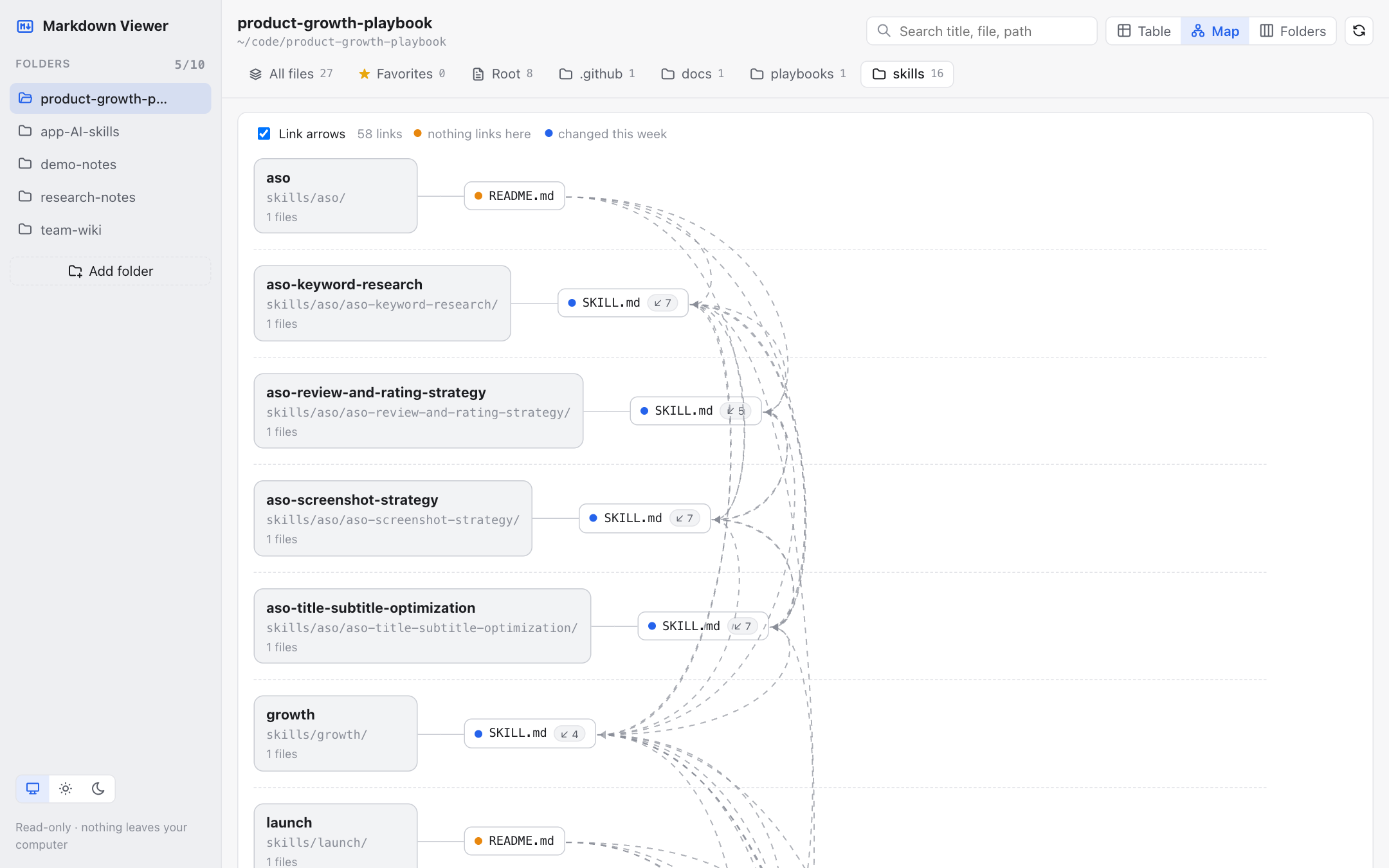
More screenshots: table view · Finder-style folders + reader with Favorites
[](https://oneclicktool.app/desktop/markdown-everywhere?utm_source=github&utm_medium=readme&utm_campaign=growth-playbook&utm_content=screenshot-table) [](https://oneclicktool.app/desktop/markdown-everywhere?utm_source=github&utm_medium=readme&utm_campaign=growth-playbook&utm_content=screenshot-reader)I made Markdown Everywhere. It's free, and it's how I keep this repo organized. → Download Markdown Everywhere for Mac or Windows · install steps
Three ways to use a skill
1. Any AI chat (Claude, ChatGPT, Gemini…): open a skill, copy the Prompt block, fill in the {{ }} parts.
2. Claude Code:
/plugin marketplace add OneClickTool/product-growth-playbook
/plugin install product-growth-hack@product-growth-hack
Then just describe your problem ("my app gets no search traffic"). The matching skill loads on its own.
3. Codex, Cursor, Gemini CLI and other agents:
npx skills add OneClickTool/product-growth-playbook
Or copy a skill folder into your agent's skills directory (for example ~/.claude/skills/).
Tip: every skill is a Markdown file, and most produce one (a checklist, a keyword sheet, a plan). To browse a folder of them as a table or a map of links, try Markdown Everywhere (free, Mac & Windows). I made it at OneClickTool.
What makes a skill here
Every skill has the same parts: Goal · When to use · Inputs · Steps · Prompt · Example output · Common mistakes. No theory dumps, no "10 generic tips". If you can't finish it in an hour and end up with something concrete, it isn't done. Example numbers are either real or clearly labelled Illustrative.
Contributing (no coding needed)
The easiest ways to help, from 2 minutes to an hour: 1. ⭐ Star the repo so more builders find it. 2. Tried a skill? Tell us what worked or didn't with a Skill feedback issue. 3. Know a great community, source or tool that's missing? Open an issue or edit the file on GitHub (the ✏️ button). 4. Share real numbers from your launch, ASO test or price change as a case study. Real examples are the most valuable thing here. 5. Write a skill. Copy the template and follow CONTRIBUTING.md, which has a step-by-step guide for first-timers.
Author
Maintained by Tu Nguyen (@nvminhtu), who builds and ships small apps and tools at OneClickTool.
Two tools I made that fit this repo: - Reading lots of skills and Markdown files? Markdown Everywhere (free, Mac & Windows) shows a whole folder at a glance. Downloads on GitHub. - Running many projects with AI agents? ShotMatic (Mac) shows every repo's next steps, blockers and uncommitted changes on one screen, and reopens the right Claude session.
Free apps
Free, open-source apps from the developer behind OneClickTool. No account, no paywall. Source, downloads and install steps are on each GitHub page.
| App | Platform | What it does |
|---|---|---|
| Markdown Everywhere | Mac & Windows | Opens a folder of Markdown files as a table, a link map or Finder-style folders, with a clean reader. |
| Server Hub | macOS | Shows every localhost server on your Mac, checks whether each one actually answers, and lets you open, stop or start them in one click. |
| TapRec | Android | Records your screen in one tap with mic or phone sound, pause/resume and a floating button, then cuts, mutes, crops or adds captions to the video. APK download with QR code. |
All are made by the maintainer of this repo. Issues and pull requests are welcome on each repo.
Support this project
The playbook is free and always will be. If a skill saved you time or helped you ship, you can support the work:

- Ko-fi: one-time support, no account needed.
- Use a OneClickTool app. Free knowledge, paid tools.
- Free ways that help just as much: ⭐ star the repo, share a skill that worked, or add a real example.
Support pays for the time spent writing new skills, keeping store rules up to date, and answering issues.
Want the same Sponsor button on your own free repo or app? Follow Open-Source Funding.
License
MIT. Use it, fork it, teach with it.